
Side by side, from anywhere.
Your team's office, where conversations start on their own.
In Beside, everyone walks around the office map. Walk up to someone and audio and video are already on: no link, no invite, no waiting for anyone to join.
Sign in to Beside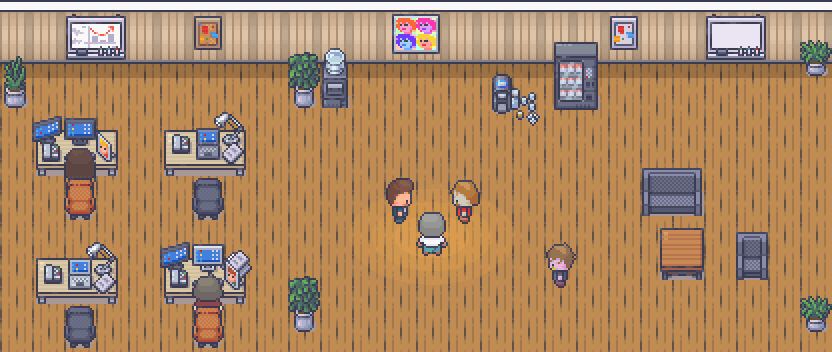
How it works
No call to schedule and no room to open. By the time you get there, the conversation is ready.

A real office, just online
Everyone has an avatar and walks around the company map, with rooms, desks and a kitchen.
Walk up, and you're talking
When two people get close, audio and video start on their own. Walk away, and it's over.
A meeting is walking into a room
Every room drawn on the map is a conversation just for the people inside it.
Your Google Calendar, if you want
Connecting your calendar is optional, and Beside works the same without it. If you connect it, you see the day's meetings inside the office, can get a heads-up before each one starts and go into Do not disturb on your own when the meeting begins.
- What we read
- Only your events, with read-only permission, at the moment we show them. We don't keep your events.
- What we keep
- The email of the Google account you connected and the read authorization, stored encrypted.
- Who sees it
- Only you. Nobody at your company sees your calendar.
- How to turn it off
- Disconnect whenever you want, in the Calendar tab. Without it, your calendar simply doesn't show up in Beside.
Beside's use and transfer to any other app of information received from Google APIs will adhere to the Google API Services User Data Policy, including the Limited Use requirements.
The details are in the Privacy Policy.
Bring your team close.
Sign in to your account and meet the people you work with in the same office.
Sign in to Beside